








100% Email routing through Smart Host

Achieving 100% email routing through a "smart host" within a local LAN in Zimbra mail server can be challenging, as it depends on various factors and conditions. However, JIL shares a general guideline on how to set up email routing using a smart host in Zimbra. Specific steps may vary based on your Zimbra version and environment.

Email Routing Through Smart Host

Email Routing Through Smart Host

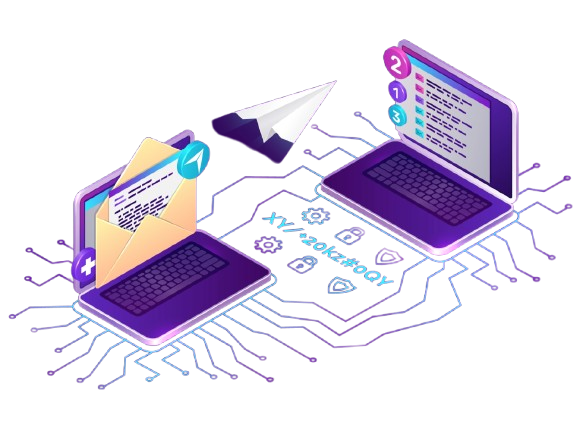
Email routing through a Smart Host allows organizations to manage and control outbound mail delivery using an intermediate relay server. Instead of connecting directly to destination mail servers, all outgoing messages are routed through a predefined Smart Host (such as Microsoft 365, Google Workspace, or a third-party mail gateway).

This setup enables centralized email management, improved deliverability, and compliance enforcement. The Smart Host authenticates with the mail server using credentials (SMTP authentication) and securely forwards messages to the recipient’s mail server via TLS encryption.

01

Configure Smart Host

Obtain the necessary details (IP address or hostname) of your smart host, which will handle email delivery for your Zimbra server. Contact your smart host provider for this information.

02

Access Zimbra Admin Console

Log in to the Zimbra Admin Console using your administrative credentials.

03

Configure Relay Host

In the MTA section, find the "Relay MTA for external delivery" option and enter the IP address or hostname of your smart host.

04

Save and Restart Services

After making the necessary changes, save the configuration and restart the Zimbra services to apply the settings.

05

Test Email Routing

Send test emails to different domains and check if they are being routed through the smart host. Monitor the mail logs for any errors or issues.


It's important to note that achieving 100% email routing through a smart host within a local LAN may not always be feasible due to various factors such as network configuration, DNS settings, spam filtering, and recipient server policies. Additionally, ensure that your smart host is properly configured and capable of handling the email traffic from your Zimbra server.

If you encounter any difficulties or specific issues during the setup, it is recommended to consult the Zimbra documentation or seek assistance from the Zimbra community or support channels for more detailed and personalized guidance
Key Technical Benefits

Key Technical Benefits:

  • Improved Deliverability: Outgoing messages use a trusted relay IP, reducing the chance of being marked as spam.
  • Centralized Control: Administrators can apply uniform filtering, security, and routing policies across all mailboxes.
  • Enhanced Security: TLS encryption ensures data privacy during transmission, and IP-based restrictions prevent unauthorized relaying.
  • Load Balancing & Failover: Multiple Smart Hosts can be configured to distribute outbound load and provide redundancy.
  • Compliance & Archiving: Enables integration with DLP, encryption, and journaling systems for policy compliance.

Services We Provide

Email issues rarely stay limited to email. What starts as a routing concern often leads into questions around deliverability, server reputation, fallback handling, or even how different systems are talking to each other behind the scenes. Many businesses come looking at email routing through smart host service, but the conversation doesn’t stop there. In practice, routing decisions begin to affect infrastructure choices, security layers, and how reliably communication flows during peak or failure scenarios. One change tends to surface another. We’ve seen teams realise that improving routing also means revisiting how applications trigger emails, how logs are monitored, or how failovers are handled when primary servers slow down. It’s rarely a single fix. That’s usually where exploration opens up. Not because more services are needed, but because systems are already connected in ways that aren’t always visible at first.

The APolitical
FOWPI
Fujifilm
Onyxaa
The APolitical
FOWPI
Fujifilm
Onyxaa

We are glad to work with

Some teams come in with clear technical gaps. Others, less so. A few already have strong internal setups, just need a second layer of thinking. Early-stage companies trying to stabilise communication flows. Mid-sized businesses where systems have grown faster than expected. Enterprise teams dealing with legacy overlaps. Different contexts, different pressures. We’ve worked alongside product teams, internal IT heads, external vendors. Sometimes stepping in quietly, sometimes being part of larger transitions. There are cases where routing was the entry point. In others, it came up halfway through. Not every engagement looks structured from the outside. That’s usually a good sign.

What they say about us

Everything looks great... Thanks for the quick turn around. We were lucky to find you guys and will definitely be using some of your other services in the near future.

James P,

We are very happy and satisfied with Jingle service. Their account manager is efficient and very knowledgeable. It was able to create a vast fan base within very short period of time. We would highly recommend Jingle Infotech to anyone.

IT Head, WWE TP

Overall, the two reports were very clear and helpful so thank you for the suggestion to do the focus group. We are currently working with our developer to implement some of these suggestions.

Len W,

Frequently Asked Questions (FAQs)

If your logs show Connection Refused while trying to hit a smart host on port 25, your ISP is likely intercepting the traffic. In 2026, forcing a ₹1.2 Cr ($130,222) mail cluster through Port 587 (Submission) is mandatory for STARTTLS integrity. This isn't a "server down" issue; it’s a Port-Level Throttling failure. You must update the zimbraMtaRelayHost attribute via zmprov or the MTA will continue timing out. A ₹0 "Configuration Oversight" that results in a ₹12 Lakh ($13,022) queue backlog.

Check your LMDB Map Permissions. If you’ve created /opt/zimbra/conf/relay_password but didn't run postmap as the zimbra user, the MTA cannot read the lookup table. This is Permission Friction. It’s the difference between a ₹3,500 ($38) CLI fix and a ₹1.5 Cr ($162,778) total communication blackout. If the sasl_passwd file is world-readable, your ₹50,000 ($542) relay credentials are leaked to the entire system. Set 600 permissions immediately.

If your relay host rejects mail with "Relay Access Denied," check your mynetworks variable. If the smart host doesn't recognize your Zimbra server’s Public IP as a "Trusted Node," it will demand SASL auth even if you’ve whitelisted it internally. This is Namespace Pollution. It turns a ₹1.2 Cr ($130,222) enterprise node into an isolated island for all outbound traffic. You must sync the zimbraMtaMyNetworks attribute across all MTA nodes or watch the ₹25,000 ($271) per-hour delivery leak grow.

If you set zimbraMtaSmtpTlsSecurityLevel to encrypt but your smart host only supports plain-text, the SMTP Handshake will terminate instantly. This is "Cryptographic Friction." We’ve seen ₹5 Lakh ($5,425) of critical transactional mail vanish because an admin enabled "High Security" without verifying the relay's capabilities. Use may for opportunistic TLS unless you are 100% sure of the peer’s cipher suite.

Because of zimbraMailTransport inheritance. If you’ve set a domain-level smart host but your catch-all address is trying to forward to a local mailbox that doesn't exist, the MTA enters a Recursive Routing Loop. This is "Transport Feedback." It results in a ₹1 Cr ($108,518) server load spike as the system tries to relay 10,000 bounce messages back to itself. Map the transport to smtp:[smart-host-ip] specifically to break the loop.

Yes. If zimbraMtaSmtpSaslSecurityOptions is set to noanonymous, noplaintext but your relay requires a plain-text login over an encrypted tunnel, the auth will fail every time. This is a Mechanism Mismatch. It’s a ₹0 "Security Hardening" error that leads to a ₹15 Lakh ($16,277) "Emergency Support" call. You must align the SASL mechanisms with the relay provider’s requirements—usually by stripping the noplaintext restriction when using TLS.

Where?

Our Address

C-15 3rd Floor, Amar Colony Main Market, Lajpat Nagar - 4,
New Delhi - 110024, India

info@jingleinfotech.com

Get In Touch

If you need assistance with any of our services please do contact us.
 demo-services
Call Now
Chat Now
×

Fill out the form and our team will get back to you shortly. We are here to help you with your queries and support.