



C-15 3rd Floor, Amar Colony Main Market,
Lajpat Nagar - 4,
New Delhi - 110024, India

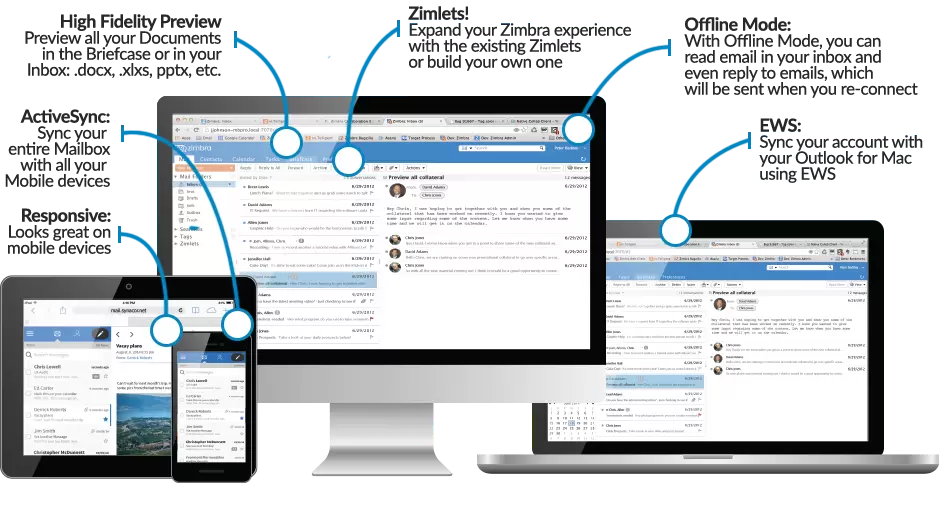
Zimbra is an enterprise-class email, calendar and collaboration solution built for the cloud, both public and private. With a redesigned browser-based interface, Zimbra offers the most innovative messaging experience available today, connecting end users to the information and activity in their personal clouds.
Zimbra Collaboration delivers your Mailbox, Contacts, Calendar, Tasks, Files and much more on any device: Smart Phone, Tablet or iPad and Desktop or Laptop Computer running Windows, Linux or OS X.
Many businesses adopt a mail platform like Zimbra with a clear intent. Move away from scattered tools, bring communication into one place. That usually works in the beginning. What typically happens over time is the system starts interacting with other parts of the business. User management ties into internal processes. Storage decisions affect performance. Security configurations begin to matter more as usage grows. These layers do not stay isolated. At JIL, we tend to look at this as a connected environment rather than a standalone setup. Choices made around mail infrastructure often influence reliability, access control, and even day to day operations in ways that are not immediately visible. This is why exploring related areas early tends to reduce friction later. Many teams only revisit these decisions once scaling, migration, or policy changes start becoming difficult to manage.
Some organisations come in with a running mail setup that needs stabilisation. Others are planning a shift, often from a mix of tools that have grown over time. Both situations are common in conversations around Zimbra at JIL. We have worked with teams where email is business critical, and with setups where it has not been reviewed in years. In many cases, the challenge is not just configuration. It sits around reliability, access control, and how communication flows internally. There are also environments where multiple users, roles, and devices interact with the system. Admin teams, end users, sometimes external access. Not always structured clearly from the start. That tends to influence how the system performs day to day. Some engagements stay limited to setup or migration. Others expand as gaps start becoming visible. The pattern is familiar. What matters is how consistently decisions are handled once the system becomes central to operations.
Honestly? Checking status helps to catch downtime, email delays, or server performance issues real fast. You don’t want your team sitting around for hours without emails, right? It is important to catch the "glitch" or "snag" before everything comes to standstill.
You can check via admin panel, server command tools, or your JIL monitoring dashboard. It is pretty straightforward if you know where to look. If the dashboard is green, you’re good. If not, you need to move fast.
Immediate troubleshooting is a must. You need to prevent email disruption and data loss before the situation gets worse. JIL team can jump in to find the root cause and fix it so your workflow stays "perfected."
Usually this is related to SMTP config, authentication errors, or server restrictions. JIL as your technology partner can check if your ports are blocked or if the settings is just messy. We fix the "handshake" so your outgoing mail actually leaves the building.
Absolutely. Security filters often stop outgoing traffic if it looks even slightly suspicious. We make the necessary seamless adjustments between your firewall and Zimbra to keep the mail flowing without compromising security.
Most cases is resolved real quick once we identify the root cause. No "endless waiting" here. We usually get your email functionality back in just a few hour(s), depending on the server access.
